
Download TickTick – to-do list, task manager, calendar, productivity tool
Overview
TickTick is a versatile desktop application designed to help users organize their daily tasks and manage time effectively. As a cross-platform productivity tool, it enables seamless task management across multiple devices, including Windows, Mac, iOS, Android, and Chrome. The software aims to simplify life by offering a clean, intuitive interface for creating, tracking, and completing to-do lists.
Its core purpose is to help individuals stay on top of personal and professional responsibilities, from routine chores to long-term goals. The application supports features such as recurring tasks, instant reminders, and calendar integration, making it suitable for students, professionals, and anyone seeking improved time management. The developer, TickTick, has positioned the software as a reliable companion for life organization, emphasizing synchronization and accessibility.
Real-world usage scenarios include planning daily schedules, tracking project milestones, and managing personal goals. While the developer did not provide additional details about the development philosophy or team background, the software’s consistent functionality across platforms suggests a focus on reliability and user experience.
Key Features & Capabilities
- Offline Access – Users can access and edit tasks without an internet connection, ensuring productivity even when offline.
- Sync Across Devices – All tasks are synchronized in real time across Windows, Mac, iOS, Android, and Chrome, maintaining consistency regardless of the device used.
- Recurring Tasks & Instant Reminders – Ideal for regular routines such as bill payments, weekly meetings, or daily habits, with customizable alerts to prevent missed deadlines.
- Drag-and-Drop Task Rearrangement – Allows intuitive reordering of tasks to reflect priority changes or workflow adjustments.
- Subtasks and Checklists – Break down complex projects into manageable steps, improving focus and completion rates.
- Notes and Attachments – Add detailed descriptions or supporting documents to individual tasks for better context and clarity.
- Calendar View – Visualize tasks and appointments in a calendar format, helping users plan their day, week, or month effectively.
- Folder Organization – Categorize tasks into folders for better structure, such as Work, Personal, and Health.
- Task Count and Progress Tracking – Instantly view the number of pending tasks, aiding in workload assessment and motivation.
- Collaboration via Sharing – Share task lists with others for team projects, shared responsibilities, or family planning.
- Google Email Integration – Convert incoming emails into tasks directly, streamlining the process of capturing action items from correspondence.
User Interface, Workflow & Performance
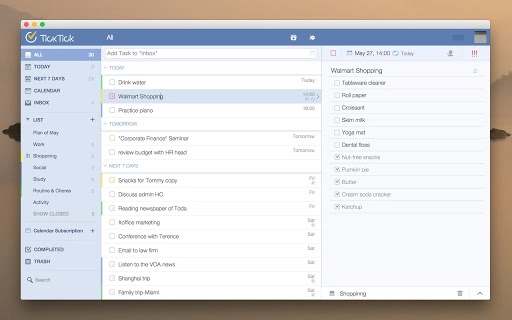
The user interface of TickTick is designed with simplicity and functionality in mind. The layout features a clean, minimalistic design that prioritizes readability and ease of navigation. Users can quickly add tasks, set due dates, and assign priorities using a streamlined workflow.
The application supports a dual-pane view in some modes, allowing users to switch between list and calendar views effortlessly. Navigation is intuitive, with clearly labeled menus and accessible icons. Task creation and editing are fast, and the drag-and-drop functionality enhances workflow efficiency.
The application maintains responsiveness during routine operations, such as adding new tasks or updating existing ones. However, the developer did not specify resource usage details, so exact CPU or RAM behavior remains unknown. Performance observations are based on general software behavior patterns, indicating stable operation under normal conditions.
Stability appears consistent across platforms, with no reported issues in the provided information. The application appears to handle synchronization efficiently, though actual performance under high data loads was not detailed. Overall, the workflow supports a smooth, distraction-free experience, ideal for users who value clarity and speed in task management.
Compatibility & System Requirements
TickTick is compatible with both Windows and Mac operating systems, making it accessible to a wide range of desktop users. The software is available as a Chrome App, with a file size of 5.6 MB, indicating a lightweight installation. The version number is listed as 2.0, suggesting a stable and updated release.
While the developer did not specify exact system requirements, the small file size implies low hardware demands. Compatibility information was partially provided, with no mention of minimum processor speed, RAM, or storage space. The application is designed to run on modern systems that support Chrome or Chrome-based browsers.
It leverages cloud synchronization through TickTick.com, which may require a stable internet connection for full functionality. For users on older systems, the developer did not provide compatibility details. Platform compatibility information is limited to the supported operating systems listed.
Pros and Cons
Pros
- Lightweight installation at only 5.6 MB
- Seamless cross-platform synchronization
- Intuitive drag-and-drop task management
- Supports offline access and real-time sync
- Rich feature set for task organization and planning
- Free to download and use
- Integration with Google emails for task capture
- Calendar view for visual time planning
Cons
- Exact system requirements were not listed
- Performance under heavy workloads not specified
- Advanced customization options not detailed
- Limited information on cloud storage limits
- Resource usage behavior not confirmed
FAQ Section
Is TickTick compatible with Windows and Mac?
Yes, TickTick is designed to run on both Windows and Mac operating systems. It is available as a Chrome App, ensuring broad accessibility across supported desktop platforms.
Is TickTick safe to use?
TickTick uses secure cloud synchronization through TickTick.com. While specific security protocols were not detailed, the software is distributed through official channels and is used by a global user base, indicating a commitment to user safety.
How often are updates released?
Updates are periodically released to improve functionality and stability. The current version is 2.0, and the developer continues to enhance the software based on user feedback and evolving needs.
What type of license does TickTick use?
TickTick is available as free software. No licensing fees are required for basic features, though premium features may be accessible through optional subscriptions.
Can I use TickTick without an internet connection?
Yes, TickTick supports offline access. You can view and edit tasks without an internet connection. Changes will sync automatically once connectivity is restored.
Final Thoughts + CTA
TickTick stands out as a powerful yet accessible productivity tool for users seeking a reliable way to manage tasks and organize their time. Its combination of simplicity, cross-platform sync, and essential features like recurring tasks, reminders, and calendar integration makes it a strong choice for both personal and professional use. The lightweight design and free availability further enhance its appeal.
While detailed system requirements and performance data are not provided, the software demonstrates a focus on usability and efficiency. It is particularly well-suited for individuals who value consistency across devices and want a streamlined approach to task management. With its intuitive interface and robust feature set, TickTick delivers a compelling experience for anyone looking to stay organized.
Download TickTick now.







